Hello,
In today's post i'm sharing two pictures which are having multiple exposure. In photography multiple exposure is stacking of two or more exposure create on single image. Most of the higher end Nikon DSLR provides in-built multiple exposure functionality, where you can take a two images with different exposure and that will be superimposed into one single image.
This functionality is not available in Nikon D3100 (the best entry level nikon SLR camera). I found the alternate solution for this in Nikon D3100.
Have you seen Image Overlay function in Retouch Menu? No? then try this today, you will feel good about your camera.. below are the pictures...


 1. Click Menu button of your Nikon D3100 and then go to retouch..
2. Select Image overlay
3. Select any two images from your camera
4. Then using UP and DOWN arrow, you can adjust the overlaying images.
5. Save the image.
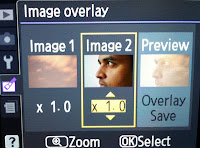 You can use this saved image and overlay on other image using above steps... to create one single image with three different exposure.
You may also like ...
Fake Smoke Photography
Fisheye effect in Nikon D3100 without Fisheye lens
How to use Cellphone flash as an off camera flash
Slow sync flash photography
In today's post i'm sharing two pictures which are having multiple exposure. In photography multiple exposure is stacking of two or more exposure create on single image. Most of the higher end Nikon DSLR provides in-built multiple exposure functionality, where you can take a two images with different exposure and that will be superimposed into one single image.
This functionality is not available in Nikon D3100 (the best entry level nikon SLR camera). I found the alternate solution for this in Nikon D3100.
Have you seen Image Overlay function in Retouch Menu? No? then try this today, you will feel good about your camera.. below are the pictures...
Steps to create multiple exposure image

2. Select Image overlay
3. Select any two images from your camera
4. Then using UP and DOWN arrow, you can adjust the overlaying images.
5. Save the image.

You may also like ...
Fake Smoke Photography
Fisheye effect in Nikon D3100 without Fisheye lens
How to use Cellphone flash as an off camera flash
Slow sync flash photography
